If you’ve been managing your sales leads in Excel, you’re probably already feeling the pain — duplicate entries, missed follow-ups, no pipeline visibility. The debate around CRM vs Excel lead management is one every Indian small business owner faces sooner or later. And in this guide, we’re going to settle it once and for all.
Quick Answer: When comparing CRM vs Excel for lead management, the core difference is this — Excel stores data passively. A CRM actively manages your entire sales process — with automated reminders, lead assignments, real-time pipeline visibility, and team collaboration built in. For Indian SMBs managing more than 50–75 active leads per salesperson per month, Excel creates more problems than it solves.
In this post, we’re going to break down CRM vs Excel for lead management in plain language — no jargon, no fluff. By the end, you’ll know exactly what’s costing you, and whether a proper CRM is worth your investment right now.
What Changed in CRM vs Excel in 2026?
Two things shifted significantly this year that make Excel a riskier choice than ever for Indian sales teams:
DPDP Rules notified (November 2025):
India’s Digital Personal Data Protection Rules were officially notified in November 2025, meaning compliance obligations are now moving into the enforcement phase. Shared Excel files create real legal exposure that simply didn’t exist before.
AI features now at SMB pricing:
Lead scoring, automated follow-up sequences, and pipeline forecasting — previously available only to large enterprises — are now standard in mid-tier CRM plans. Small teams of 5–10 people can access the same intelligence that large organisations had to build from scratch.
Why Do Most Small Businesses Still Use Excel for Lead Tracking?
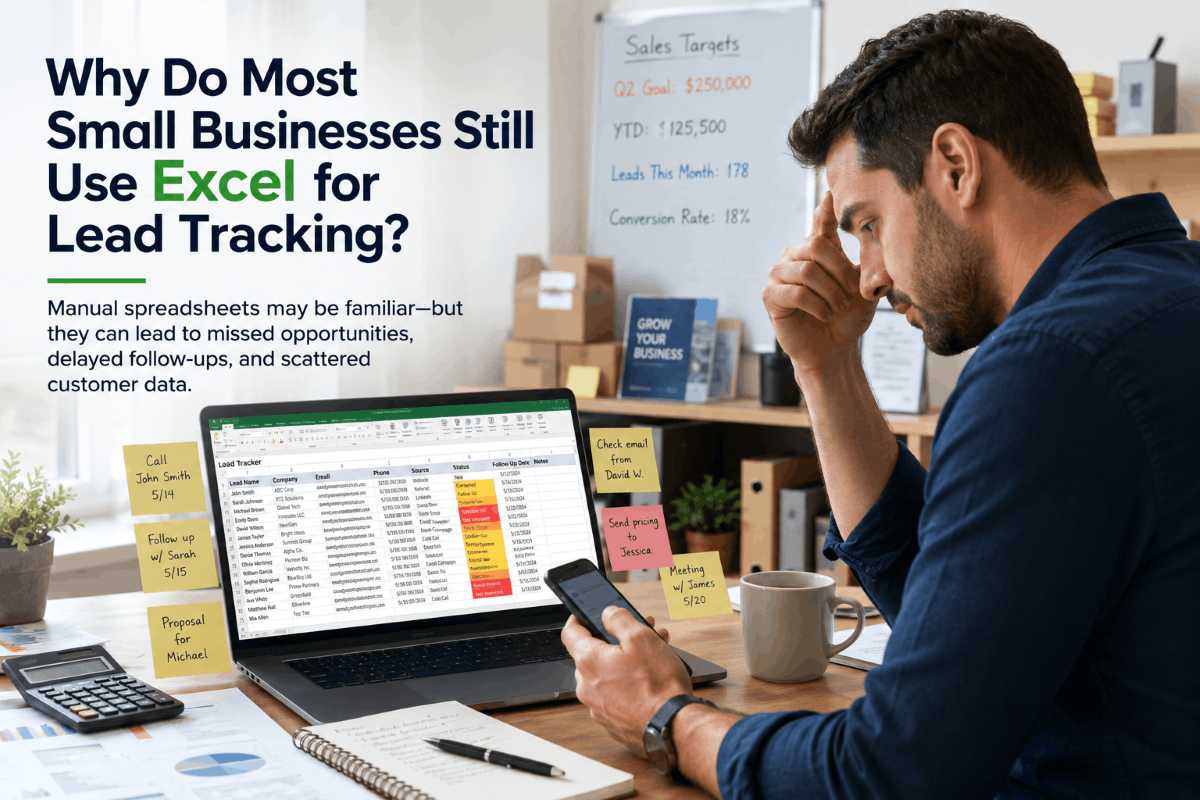
It’s a fair question. Excel has been around for decades. It’s already installed on most computers, everyone on the team knows how to use it, and there’s no monthly subscription to justify.
But think about what actually happens in your day-to-day lead tracking:
- Someone updates a cell, and you don’t know who did it or when.
- Two salespeople accidentally work the same lead because no one’s assigned ownership.
- A hot prospect calls back, and your rep has no context about the previous conversation.
- You try to generate a weekly pipeline report, and it takes half a day to compile.
Sound familiar? That’s not a people problem — it’s a tool problem.
Excel was built for structured data at rest. Leads are dynamic — they call back, they ask questions, they go cold, they come back six months later. Managing that kind of living, moving information in static rows and columns, is where things start breaking down.
What Is a CRM and How Is It Different From a Spreadsheet?
A CRM (Customer Relationship Management system) is software specifically designed to manage your relationships with prospects and customers across the entire sales cycle.
Where Excel stores data, a CRM manages it; the difference matters more than most people realise.
With a sales tracking software like 99Sales CRM, every lead has its own activity timeline — calls, emails, meetings, notes, follow-up reminders, and deal stage updates, all in one place. Any salesperson on the team can open a lead and instantly see the full history. No digging through email threads. No calling a colleague to ask, “Wait, did we speak to this guy already?”
This is what separates a CRM from a spreadsheet. It’s not just storage — it’s context.
CRM vs Excel for Lead Management: A Direct Comparison
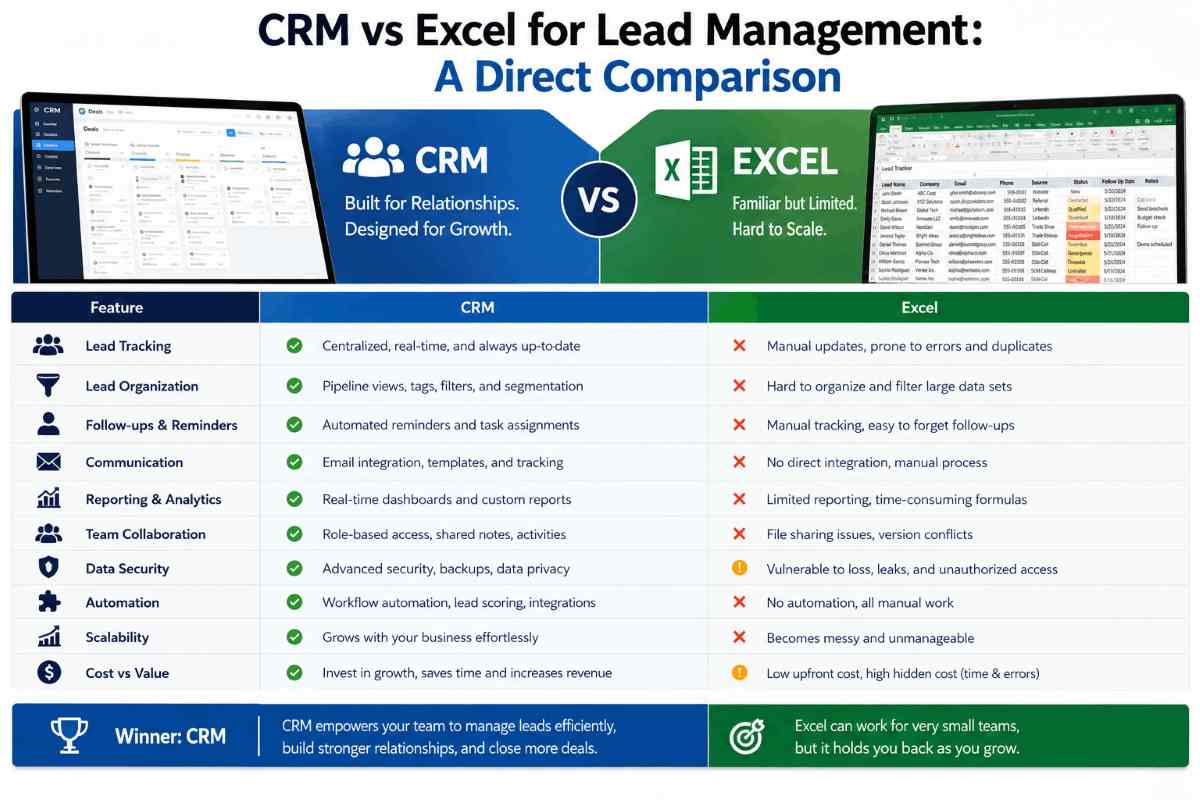
When you look at CRM vs Excel lead management side by side, the difference becomes clear almost immediately. Excel is a spreadsheet tool — it stores data. A CRM is a sales system — it manages your entire lead journey from first contact to deal closed. Let’s break it down feature by feature.
Let’s put this side by side so it’s easy to compare.
1. CRM vs Excel: Lead Assignment and Ownership
Excel: You manually type a name in the “Assigned To” column. If two reps are looking at the same sheet, there’s no alert, no lock. Leads get double-contacted or completely missed.
CRM: As a result, leads are automatically or manually assigned to specific reps. Each lead has a clear owner. You can also set up automated lead assignment rules — so a lead from, say, the education sector automatically goes to your education sales rep.
2. CRM vs Excel: Follow-Up and Reminders
Excel: No built-in reminder system. You either remember to follow up, or you set a calendar event manually for every single lead (and hope the reminder fires when you’re not in a meeting).
CRM: Follow-up tasks and reminders are built directly into each lead. Your rep gets notified and, therefore, they never forget to follow up. This alone can increase your conversion rate significantly — research consistently shows that 80% of sales require five or more follow-ups to close, yet 44% of salespeople give up after just one attempt (SPOTIO, ZoomInfo). That gap is where your deals are dying.
3. CRM vs Excel: Team Collaboration
Excel: Sharing a spreadsheet across a sales team is a nightmare. Google Sheets helps somewhat, but version conflicts, accidental deletions, and permission chaos are constant problems.
CRM: The entire team works from one live system. No version confusion. Furthermore, everyone sees the same data updated in real time. A manager can check rep performance without asking for a report.
4. CRM vs Excel: Sales Pipeline Visibility
Excel:
You can build a pipeline view in Excel if you know formulas well. But it takes time to build, breaks when data gets messy, and gives you a static snapshot — not a live view.
CRM:
A visual sales pipeline management board shows exactly where every lead is — from first contact to deal closed. You can filter by rep, product, date range, or lead source. Takes seconds, not hours.
5. CRM vs Excel: Reporting and Analytics
Excel:
Custom reports require formulas, pivot tables, and someone with decent Excel skills. Every report is a manual exercise.
CRM:
Reports are pre-built and customisable. Want to see which lead source is converting best this quarter? Two clicks. Want to see which rep has the most stalled deals? Done. This kind of sales-tracking software insight helps leadership make better decisions faster.
6. CRM vs Excel: Data Security and Scalability
Excel:
If the file is on someone’s laptop and that laptop is stolen, lost, or wiped, your entire lead database is gone. And if someone emails the file outside the company, your customer data is completely exposed. This is now a legal concern, too. India’s Digital Personal Data Protection (DPDP) Act creates real obligations around how customer data is stored, accessed, and protected. Managing customer data in shared Excel files creates genuine compliance exposure that didn’t exist a few years ago.
CRM:
In addition, role-based access controls mean only authorised people can view or edit specific data. Everything is stored securely in the cloud. You can see who accessed what and when. which also helps with DPDP compliance.
7. Scalability
Excel:
Works fine with 50 leads. Gets messy at 200. Most Indian sales teams start feeling the real pain around 50–75 active leads per salesperson per month — beyond that, spreadsheets become a liability.
CRM:
Designed to scale. Simply put, whether you have 100 or 100,000 leads, the system works the same way— fast, organised, and searchable.
8. Multi-Channel Lead Capture
Excel:
No integration with lead sources. Someone has to copy leads from every platform into the sheet manually — every single day.
CRM:
In 2026, Indian SMB leads come from everywhere — IndiaMART, JustDial, Facebook Ads, your website, WhatsApp inquiries, Instagram DMs, and field visits, often simultaneously. A CRM pulls all of these into one place automatically. Without it, leads from even one missed channel go cold before anyone follows up.
What Does It Actually Cost to Stick With Excel?
Here’s something most business owners don’t calculate: the cost of a lost lead.
Let’s say you’re a travel agency in Kolkata. Average deal value is ₹50,000. If your rep misses follow-ups on just 10 leads per month because there’s no reminder system, and you typically convert 20% of properly followed-up leads — that’s ₹1,00,000 in lost revenue every single month.
A good CRM for a small business in India might cost you ₹3,000–₹8,000 per month. The math makes itself.
Beyond money, there’s also the human cost — reps spending time on manual data entry instead of selling, managers spending Friday afternoons building Excel reports instead of coaching their team, and business owners never really knowing if their pipeline is healthy until it’s too late.
When Does It Make Sense to Switch From Excel to a CRM?
Here are the signs you’ve outgrown Excel:
- You have more than 3 salespeople managing leads
- Leads are slipping through the cracks regularly
- You can’t tell, off the top of your head, how many active leads are in your pipeline right now
- Your follow-up process depends on individual memory or sticky notes
- You’ve lost a deal because no one remembered to call back
- You’re spending more than 2 hours a week compiling sales reports
If three or more of those are true for your business, you need a proper lead management system — not a better spreadsheet.
Why Indian SMBs Are Choosing CRM Over Excel in 2026
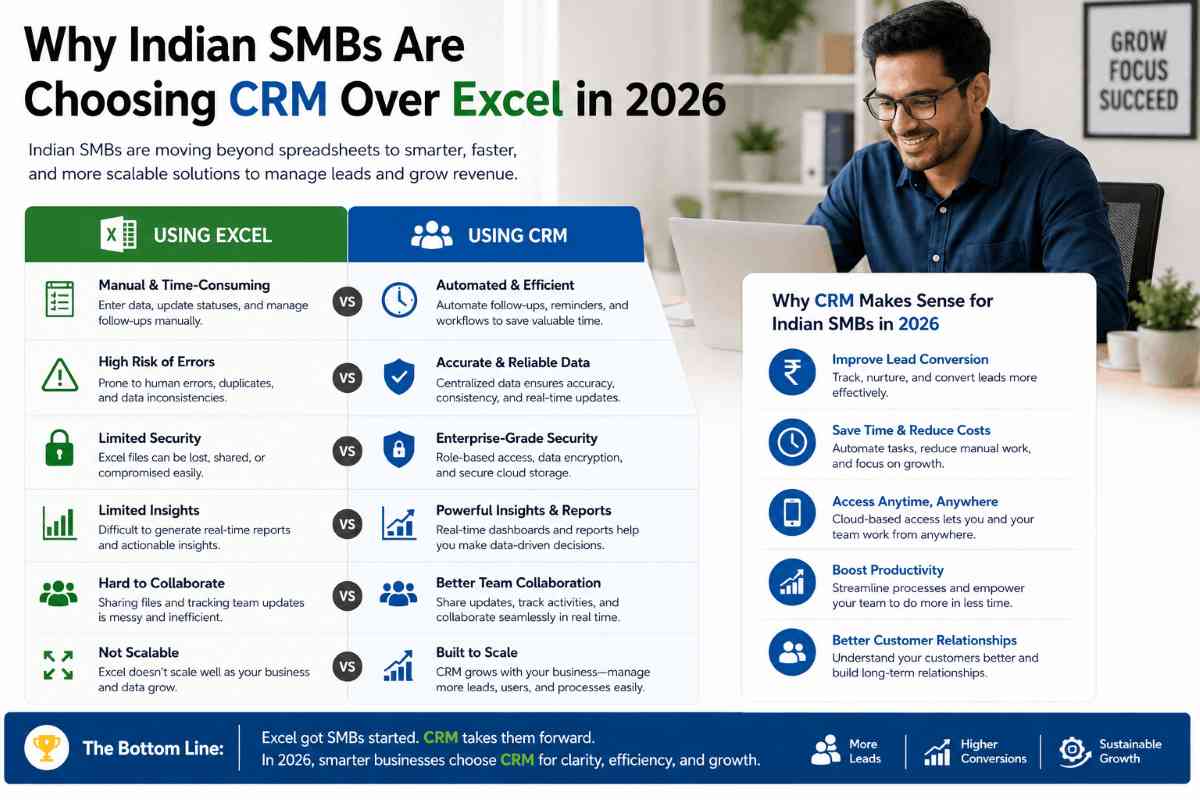
The Indian SMB market has changed significantly over the last two years. Customers are more informed, sales cycles are faster, and competition has increased in almost every sector — real estate, insurance, education, travel, and digital services.
1. Multi-channel lead chaos
Leads now arrive from IndiaMART, JustDial, Google Ads, Instagram, WhatsApp, and field visits — all at the same time. Without a CRM pulling everything into one place, something always falls through.
2. WhatsApp as a primary sales channel
WhatsApp is how most Indian customers communicate with businesses. A CRM with WhatsApp integration means your team captures every conversation in the lead timeline — not scattered across personal phones.
3. AI-powered features now available at SMB pricing
Features like lead scoring, automated follow-up sequences, and pipeline forecasting — which previously required enterprise budgets — are now standard in mid-tier CRM plans. Small teams of 5–10 people can now get the same pipeline intelligence that large sales organisations had to build from scratch.
Businesses that have adopted lead tracking software are consistently closing more deals than those still managing customer data in spreadsheets. The reason isn’t complicated: they know their pipeline better, their reps follow up faster, and they lose fewer leads to poor memory or communication gaps.
At 99Sales CRM, we’ve built a product specifically for the Indian market — with WhatsApp integration, Indian language support considerations, and pricing that actually makes sense for SMBs in India. You don’t need an enterprise budget to run a proper CRM — and come out ahead.
CRM vs Excel: Quick Summary Table
| Feature | Excel | CRM (like 99Sales) |
|---|---|---|
| Lead Assignment | Manual | Automated |
| Follow-up Reminders | None (external tools needed) | Built-in |
| Team Collaboration | Difficult | Seamless |
| Pipeline View | Manual build required | Live visual board |
| Reporting | Manual pivot tables | Auto-generated |
| Data Security | Low (file-based) | High (cloud + access control) |
| DPDP Compliance | Risky | Supported |
| Multi-Channel Lead Capture | Manual copy-paste | Automated |
| AI-Powered Features | None | Lead scoring, forecasting |
| Scalability | Breaks at scale | Built to scale |
| WhatsApp Integration | None | Available |
| Cost for 3 Users | ₹0 (but hidden costs) | ₹3,000–8,000/month |
Making the Transition: What to Expect
Although switching from Excel to a CRM feels daunting, it doesn’t have to be. Here’s a realistic picture of what the first 30 days look like:
Week 1:
Import your existing leads from Excel into the CRM. Most modern CRMs, including 99Sales, allow you to upload a CSV file directly — your data moves over in minutes, not days.
Week 2:
Set up your pipeline stages to match your actual sales process. Define what “contacted,” “demo done,” “proposal sent,” and “negotiation” mean for your business.
Week 3:
Get your team using it daily. The biggest barrier is habit, not complexity. Once reps see that they’re getting reminder notifications and they’re not losing leads, adoption happens naturally.
Week 4:
Look at your first real report. See which lead sources are performing, which reps have the most stalled deals, and where your pipeline is strong or weak.
By month two, most teams using 99Sales CRM report that they can’t imagine going back to a spreadsheet.
FAQ: CRM vs Excel Lead Management
Q1. Is Excel good enough for managing leads if I’m just starting?
No, not for long. If you have fewer than 20 leads and you’re the only salesperson, Excel can work short-term. But even then, building good habits with a lead management system early saves you a painful migration later when you’re busier.
Q2. What is a CRM, and do small businesses in India really need one?
A CRM (Customer Relationship Management) system is software that helps you track, manage, and follow up with your leads and customers in a structured way. Yes — small businesses in India absolutely benefit from CRM, especially in competitive sectors like real estate, insurance, and education, where follow-up speed directly affects conversion.
Q3. How is CRM different from Excel for lead tracking?
The core difference is that Excel stores data passively while a CRM actively manages your sales process — with reminders, assignments, pipeline stages, and real-time team collaboration. Excel requires manual everything; a CRM automates the administrative side so your team can focus on selling.
Q4. Is it expensive to switch from Excel to a CRM?
Not necessarily. A CRM for small businesses in India, like 99Sales CRM, is priced to fit SMB budgets. When you factor in the leads you’re losing with Excel — missed follow-ups, no reminders, no pipeline visibility — a CRM typically pays for itself within the first month.
Q5. Can I migrate my Excel lead data to a CRM easily?
Yes. Most CRM platforms, including 99Sales, allow you to import data directly from an Excel or CSV file. Your existing leads, contact information, and notes can be transferred quickly without starting from scratch.
Q6. What features should I look for in a lead tracking software for my Indian business?
Look for: WhatsApp integration (since most Indian customers communicate via WhatsApp), multi-channel lead capture (IndiaMART, JustDial, Facebook Ads), customisable pipeline stages, team-level reporting, mobile app access, and pricing in INR with Indian customer support.
Q7. How many leads can I manage in Excel before it becomes a problem?
Most Indian sales teams start feeling the pain at around 50–75 active leads per salesperson per month. With multiple reps involved, even fewer leads can create chaos in a shared spreadsheet.
Q8. Does 99Sales CRM work for businesses outside metros?
Absolutely. 99Sales CRM is designed specifically for the Indian SMB market, which means it works equally well for businesses in Kolkata, Surat, Jaipur, Coimbatore, and smaller cities — not just Mumbai and Bengaluru. Our pricing and features are built with Indian business realities in mind.
Q9. Does switching to a CRM help with India’s data protection laws?
Yes. India’s Digital Personal Data Protection (DPDP) Act requires businesses to control who can access customer data and maintain proper records. A CRM with role-based access controls and audit logs is far safer than a shared Excel file, which gives no visibility into who viewed or exported your customer data.
Final Thoughts
The CRM vs Excel lead management debate really isn’t a debate at all — it’s a question of whether you want to scale your sales or keep managing chaos.
Excel served a purpose, and it got many businesses off the ground. However, it was never designed to manage an active sales pipeline, and every month you use it as one is a month where leads are quietly falling through the cracks.
If you’re ready to see what a proper CRM looks like for your business, visit 99salescrm and check out what we’ve built for Indian SMBs. There’s no obligation — just a clearer picture of what’s possible when your sales process actually has a system behind it.
Ready to Replace Excel with a Smarter Sales System?
If your team is still managing leads in spreadsheets, every day is costing you deals. 99Sales CRM is built specifically for Indian small businesses — with WhatsApp automation, automated follow-up reminders, multi-channel lead capture, and a visual sales pipeline that gives you full control.
No complex setup. No enterprise pricing. Just a CRM that works the way Indian sales teams actually work.
👉 Start Your Free Trial at 99salescrm
About the Author
This article was written by the 99Sales CRM Team — a group of sales and CRM specialists focused on helping Indian SMBs build better sales processes.
99Sales CRM is built specifically for the Indian market, with WhatsApp integration and SMB-friendly pricing.
Last updated: June 2026