What is CRM software? If you have ever lost a lead because someone forgot to follow up, or had a customer complain that “no one seems to know my history”, you already know the problem it solves. CRM software is the system that stops those moments from happening. In fact, it is not just a tool for big corporations. It is the foundation that any business — five people or five hundred — needs to manage customer relationships properly and grow without things falling apart.
This Blog will explain what CRM software is, how it is used in the real world, why it is important to your business, and what features to consider when selecting the appropriate solution for your business. No confusion, no hype – only real, practical answers you can act on today.
What is CRM Software?
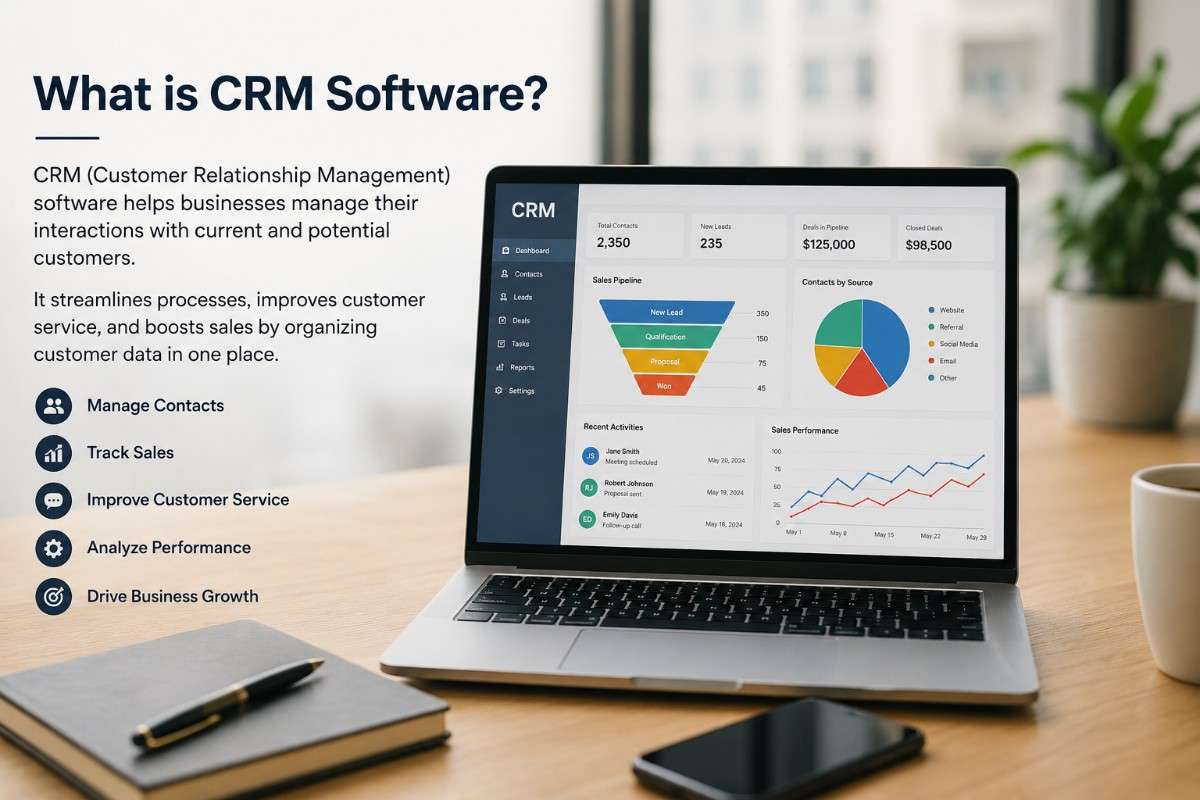
Customer Relationship Management software (CRM Software) is a business platform that brings all your customer interactions into one place — contacts, emails, deals, calls, and support history. It gives your sales, marketing, and support teams one shared view of every customer.
It’s like a contact book, but with a supercharge! However, a CRM not only stores names and phone numbers, but it also stores every email, phone call, sales opportunity, support ticket and deal note that is associated with any person or organisation you interact with. It provides your sales, marketing and support teams with a unified view of all your customers, meaning no slip-ups.
The name “CRM” software refers to a set of programs that solve three key questions that businesses must address:
- Who are my customers and what do they need?
- Where are my leads in the sales pipeline right now?
- Which relationships need attention today?
Once those answers are clear, closing deals and keeping customers becomes much easier.
Why Do Businesses Actually Need CRM Software?
73% of businesses globally now use CRM software, and 81% plan to increase their CRM budgets in the next two years. (Nucleus Research, 2026). Most business owners know this situation. A warm lead reaches out. A salesperson follows up once, gets busy, and the lead goes cold. Six months later, that same person signs with a competitor. It stings — and the worst part is it was entirely avoidable.
However, Customer Relationship Management Software is what prevents that from happening. It puts structure around your customer journey. Nothing slips through. Here is what businesses report most consistently after going live with a CRM:
1. Nothing Gets Forgotten
Every call, email, and meeting is automatically logged against the right contact. Your team stops relying on memory or personal notebooks. As a result, new hires can get fully up to speed on any customer in minutes.
2. Sales Pipelines Become Predictable
Companies using CRM see an average 29% increase in sales and 34% improvement in sales productivity — and sales forecast accuracy improves by up to 42%. (Source: Salesforce). Sales CRM Software gives your team a real-time view of every deal in the pipeline — which stage it is in, what the next step looks like, and when it is likely to close. Revenue forecasting stops being guesswork. Therefore, it starts being reliable and consistent.
3. Teams Stop Working in Silos
Marketing, sales, and support teams naturally drift apart. A CRM brings them back together by giving everyone access to the same customer data. When support knows what a customer bought, and sales know their issues, every conversation gets sharper. Nothing feels generic.
4. Customer Retention Improves
Research consistently shows that acquiring a new customer costs significantly more than retaining an existing one, making every missed follow-up an expensive mistake.
5. Decisions Get Backed by Real Data
Modern online CRM software comes with built-in reporting dashboards. You can see which campaigns are generating leads, which deals are stalling, and how individual team members are performing — all in real time, without waiting for someone to pull a manual report.
How Does CRM Software Actually Work?
Most people picture a CRM as something complicated. The reality is much simpler, and once you understand the basic flow, it clicks pretty quickly.
Customer data comes in from forms, emails, calls, social media, and live chat. Everything lands in one system. Every contact has one clean record.
Their details, company, emails, deals, and call notes all live in one record. You open it, and everything is there. No inbox digging. No asking colleagues if you spoke to them before.
Your team logs calls, sends emails, moves deals forward, and sets reminders — all inside the CRM. Everyone stays on the same page.
Automation is where most people are surprised. The CRM sends welcome emails, routes leads, and triggers follow-up reminders on its own. No manual work needed.
Managers get a live dashboard of everything — pipeline value, team activity, deals at risk, revenue on track. As a result, there is no need to chase people for updates. It is all there whenever they need it.
That is really the heart of it. Once your team uses it consistently, the CRM becomes the one place everyone trusts. That changes everything.
How AI is Changing CRM Software in 2026
CRM software has moved well beyond contact storage. In 2026, the most impactful shift is AI — and it is changing what sales teams can actually do in a day. AI in CRM now handles lead scoring automatically, predicts which deals are most likely to close based on historical patterns, flags stalled pipelines before a manager notices, and drafts follow-up emails that match the tone of prior conversations. According to G2, 45% of sales professionals now use AI tools weekly, and companies that have integrated AI into their CRM workflows are reporting measurable gains in win rates and deal sizes. For businesses evaluating CRM software today, AI capability is no longer a premium add-on — it is a baseline expectation.
Key Features to Look for in the Best CRM Software for Businesses
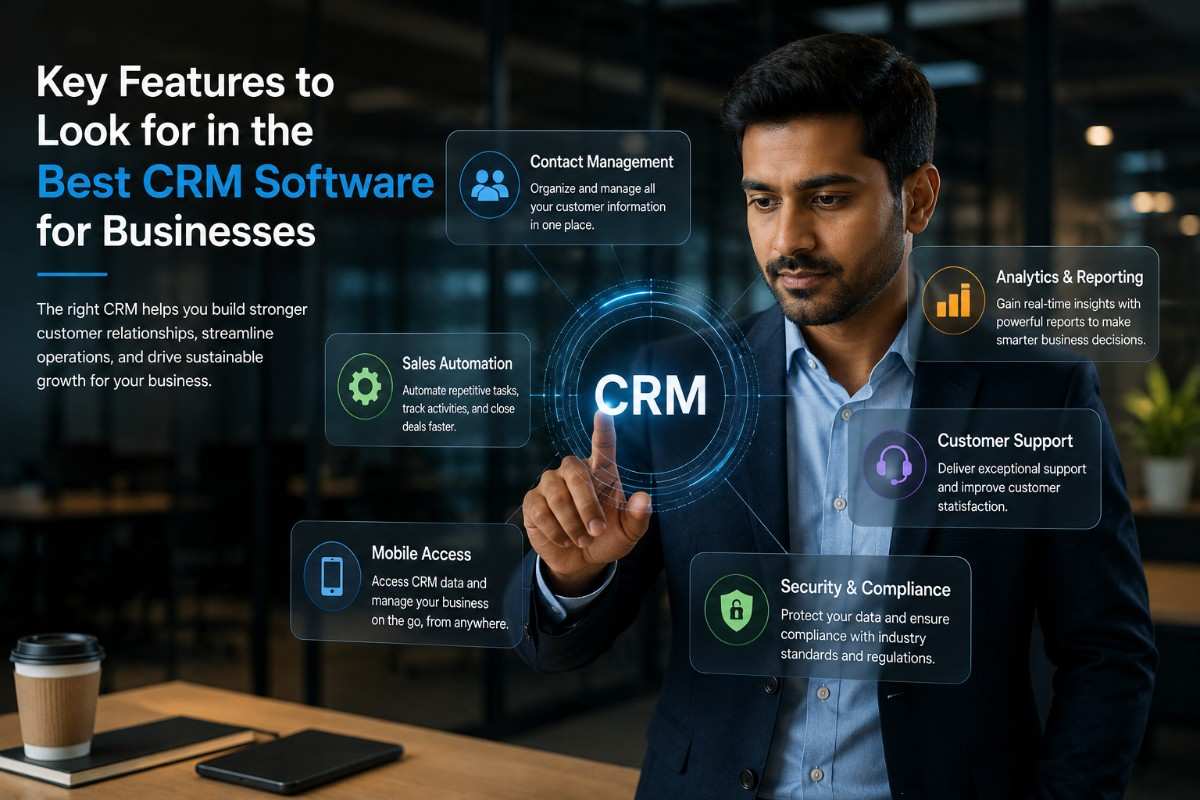
Not every CRM is built the same way. When you are evaluating the best CRM software for businesses, these are the features that actually make a practical difference:
Contact and Account Management
A clean, searchable database of all your contacts and companies, with complete interaction history attached to every record. This is the foundation on which everything else is built.
Visual Sales Pipeline
A drag-and-drop board where you see every live deal at once. Without this, your pipeline is just guesswork. This is the heart of CRM tools for sales management. Explore how Pipeline Management works in practice.”
Email Integration
Two-way sync with Gmail or Outlook so every email is automatically logged against the right contact. No copy-pasting, no manual logging — it just works.
Task and Activity Management
Built-in reminders, call logging, and meeting scheduling. Follow-ups never slip, even on busy days.
Marketing Automation
Drip campaigns, lead scoring, and automated nurture sequences that run in the background while your team focuses on the conversations that actually need a human. See how Automation handles this for your team.
Reporting and Analytics
Revenue forecasting, deal velocity tracking, activity reports, and campaign ROI dashboards that give managers a real view of what is happening — not what people say is happening. Check out our Reports feature for a closer look.
Mobile Access
If your field reps cannot use the CRM on their phone, they will not use it at all. A strong, fully functional mobile app is non-negotiable.
Integrations
Your CRM should connect with your existing tools. Accounting, email marketing, support, and your website. A CRM that works alone creates more problems than it solves.
CRM System for Small Business: Do You Really Need One?
Small business owners ask this constantly — “Is a CRM overkill for a team our size?”
Honest answer: If you have more than ten active customer conversations happening at once, you need a CRM system for a small business. No question about it.
Spreadsheets collapse fast. For example, they break when two people edit at once. They fall apart when a key person leaves. They cannot handle growth. A CRM replaces all of that with something scalable. Additionally, many platforms offer free plans that cover the basics well.
The good news is that small business CRM options are affordable. Many offer free plans. You start small and upgrade as you grow.
What small businesses gain most from a CRM:
- One place for every customer’s history — no more hunting through email threads or arguing over which spreadsheet is current
- Automated follow-ups — warm leads stay warm because the system reminds you, not just your memory
- Team visibility — everyone can see who owns what, so nothing gets double-handled or dropped
- Fast onboarding — new team members can learn every active customer relationship in their first day, not their first month
For Indian SMEs and startups, a CRM with WhatsApp integration is especially valuable — since most customer communication in India happens over WhatsApp. 99SalesCRM supports Email, SMS, and WhatsApp from within the same platform, meaning your team never has to switch tabs to follow up. Whether you run a real estate business in Mumbai, an EdTech startup in Bengaluru, or a services firm in Kolkata, the right CRM adapts to how Indian businesses actually communicate.
Online CRM Software vs. On-Premise: Which Is Right for You?
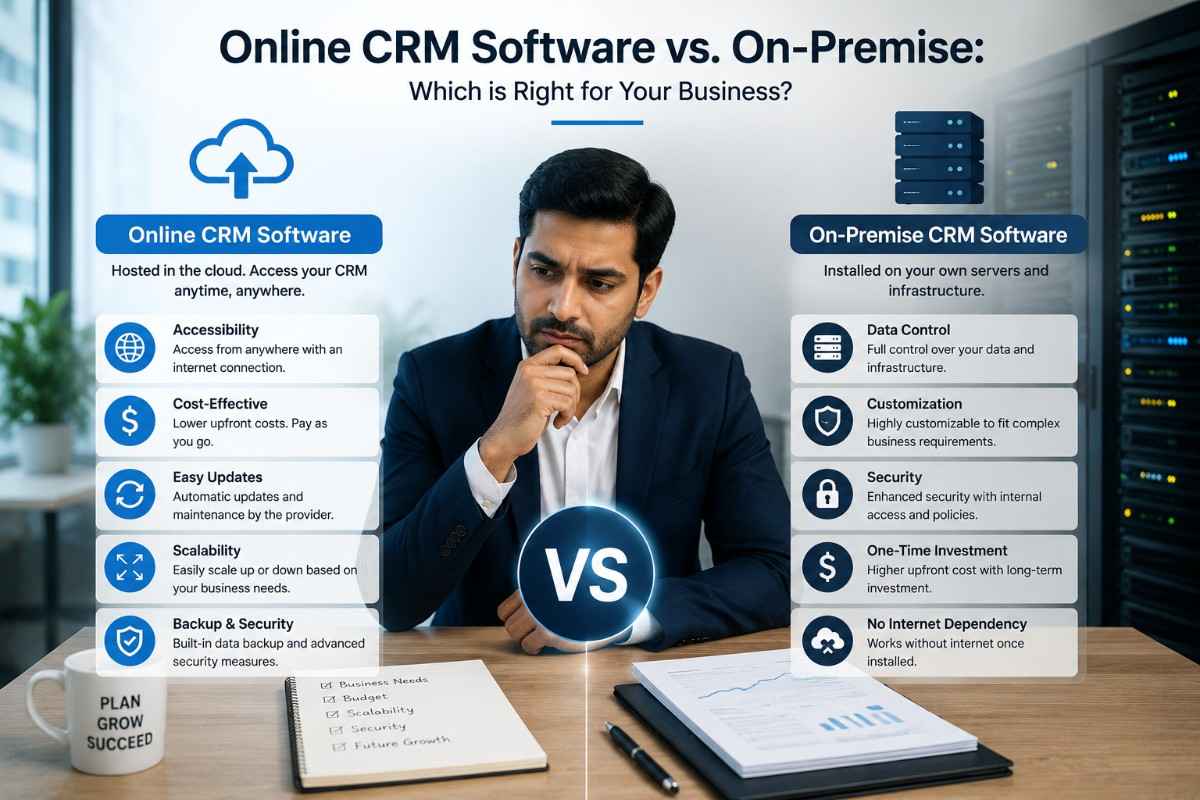
A decade ago, CRM meant buying servers and waiting weeks to go live. Today, most businesses use online CRM software. The reasons are hard to argue with.
| Feature | Online CRM Software | On-Premise CRM |
|---|---|---|
| Setup Time | Hours | Weeks to months |
| Upfront Cost | Low (subscription) | High (licensing + hardware) |
| Maintenance | Handled by the vendor | Your IT team |
| Accessibility | Anywhere, any device | Usually office-only |
| Updates | Automatic | Manual |
| Security | Enterprise-grade (top vendors) | Your responsibility |
For most businesses, online CRM software wins. You get strong security, automatic updates, and access from any device—no infrastructure to manage.
Unless you are in a heavily regulated industry, therefore, cloud-based is almost always the right call.
CRM Tools for Sales Management: What Sales Teams Actually Get Out of It
Sales teams feel the impact of a CRM more than anyone. Here is what CRM tools for sales management deliver every day.
Lead prioritisation — Lead scoring surfaces the hottest opportunities, so reps spend their time where it is most likely to convert, not just where the most recent email landed. Learn more about our Lead Management feature.
Activity visibility — Managers can see who is making calls, sending emails, and booking demos without asking for manual updates or hovering over people’s shoulders.
Deal stalling alerts — When a deal has sat in the same pipeline stage for too long, the CRM flags it automatically. No more deals quietly dying in the pipeline unnoticed.
Real-time quota tracking — Reps can see their own progress against the target at any moment. That kind of transparency keeps motivation consistent, especially toward the end of the month.
Competitive intelligence — Many CRMs let you log which competitors are involved in a deal. Over time, that data shows you exactly who you are losing to and why — which is incredibly valuable for sales coaching.
Easier team selling — When multiple people are working on a deal together, the full conversation history and all notes are visible to everyone. No long email chains, no briefing someone before a call.
Common Mistakes Businesses Make When Implementing CRM Software
The best CRM will still fail if set up poorly. However, these mistakes are completely avoidable:
Choosing a system that is too complex — A feature-heavy enterprise CRM sounds impressive, but for a 10-person team, it creates more friction than it relieves. Match the tool to your actual size and stage.
Migrating dirty data — Importing thousands of duplicate, incomplete, or outdated contacts into a shiny new CRM just gives you a cleaner version of the same mess. Clean your data before you migrate it.
Skipping proper team training — Adoption is everything. If your team does not see how the CRM helps them personally, they will not use it. Training is not optional.”
Using it only as a reporting tool — CRMs are most valuable when they are part of daily work, not just a place managers go to pull numbers at the end of the month.
Keeping the default pipeline stages — Default stages are generic. Map your actual sales process and build your pipeline around how your team really sells.”
How to Choose the Right CRM Software for Your Business
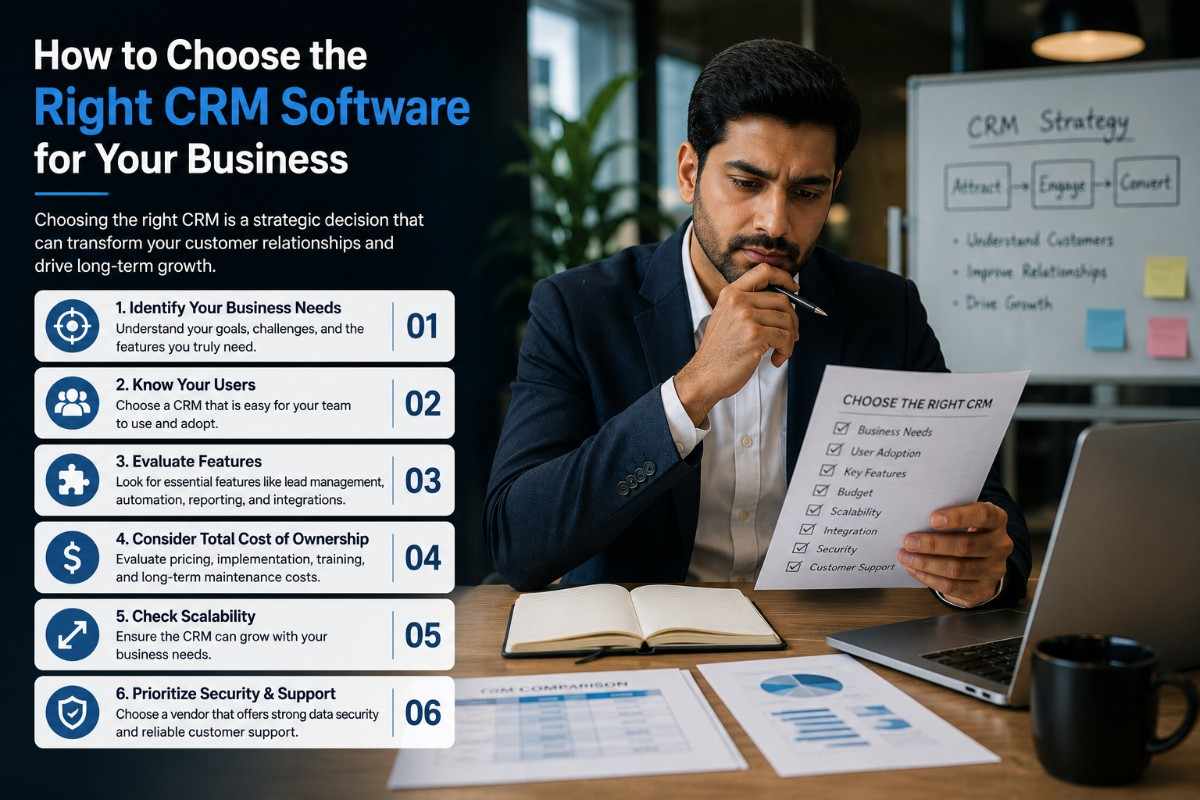
Here is a practical five-step framework that makes the decision clearer:
Step 1 — Define your primary use case. Is this mainly for sales pipeline management, marketing automation, or customer support? That answer should shape everything else in your evaluation.
Step 2 — Be honest about your team’s technical comfort. Developers can handle a complex CRM. A non-technical team needs something that works straight away.
Step 3 — List your must-have integrations first. Write down every tool your team currently uses and check compatibility before you get too deep into any evaluation.
Step 4 — Run a real trial with real data. Trial with real data. Use real deals and real contacts. Dummy data tells you nothing.
Step 5 — Think two years ahead. Switching CRMs is painful, expensive, and disruptive. Therefore, choose something that can grow with you, not just something that solves today’s problem.
FAQ:
1. What is CRM software?
CRM software is a platform that stores all customer contacts, deals, emails, and support history in one place — giving every team a shared, real-time view of every customer so nothing gets missed.
2. Is CRM software only for large businesses?
Not at all. Some of the fastest and clearest returns on CRM investment happen in small and mid-sized businesses, where informal systems like spreadsheets and shared inboxes are starting to break down. There are excellent, affordable options built specifically as a CRM system for small businesses with no enterprise complexity required.
3. How long does it take to set up CRM software?
For cloud-based online CRM software, a basic setup can be done in a single day. A full implementation — including custom pipeline stages, integrations, and data migration — typically takes two to four weeks, depending on the size and complexity of your operation.
4. What is the difference between CRM and ERP software?
ERP (Enterprise Resource Planning) manages the operational backbone of a business — finance, inventory, HR, supply chain. CRM focuses specifically on the customer-facing side — sales, marketing, and support. They serve different functions and often integrate with each other in larger organisations.
5. Can CRM software help with customer retention?
Absolutely — and this is one of the most underused benefits. A CRM lets you proactively manage existing accounts through automated renewal reminders, customer health score tracking, and full visibility into each account’s support history. Retention improves when nothing falls through the cracks.
6. Is my customer data safe in an online CRM?
Reputable online CRM software vendors take security seriously — data encryption, role-based access controls, regular third-party audits, and compliance with regulations like GDPR are standard practice at the top tier. In most cases, your data is better protected in a major cloud CRM than it would be on a local server managed internally.
7. What is the average cost of CRM software?
Pricing varies significantly depending on features and team size. 99SalesCRM offers three plans. The Embark plan is completely free — forever, with no credit card required, supporting unlimited users up to 1,000 records. The Exceed plan is ₹1,250/month and includes everything in Elevate, plus dedicated phone support and an account manager. Onboarding training is available at a one-time cost of ₹500 for new teams.
8. How does CRM software integrate with email marketing?
Most CRMs include email marketing tools or connect with platforms you already use. This lets you segment contacts using CRM data and track how campaigns affect your pipeline. Marketing and sales finally work together.
Final Thoughts
When you strip it back, what CRM software really comes down to is one thing: it is the system that makes it possible to run a customer-focused business at scale without things breaking down. Without it, you are depending on individual memory, good intentions, and luck. However, with it, you build a repeatable operation that grows revenue, retains customers, and keeps your team focused on the right work.
Whether you need Sales CRM Software for your team, a simple CRM system for a small business, or understand where Customer Relationship Management Software fits in your tech stack, the right CRM is not a cost. It pays for itself. The average ROI on CRM investment is approximately ₹820 for every ₹100 spent — meaning every rupee you invest returns more than eight times. (Source: Nucleus Research)
The businesses winning in competitive markets right now are not always the biggest ones. They are the most organised ones. A CRM is how you build that kind of operation.
Start Your Free Trial Today
👉 Get Your Free Trial with 99SalesCRM Today
📞 Contact us or WhatsApp: +91 8910711411, 📧 Email: info@99salescrm.com,📍Serving businesses across India.