If you’re running a small business in India, chances are your leads aren’t landing in your inbox anymore. They’re landing in your WhatsApp. Someone messages you from an Instagram ad, a JustDial listing, or a “Hi, I saw your ad” text. Suddenly you’re juggling that conversation alongside fifty others, trying to remember who said what and who still owes you a follow-up. This is exactly the gap that WhatsApp CRM software was built to close.
In this guide, we’ll walk through what it actually is, how it works behind the scenes, and why so many Indian businesses are moving their entire sales process onto this one platform in 2026. If you’re still comparing your options at a broader level, our guide on choosing CRM software for small businesses in India is a good starting point before you narrow in on WhatsApp specifically.
What is WhatsApp CRM Software?
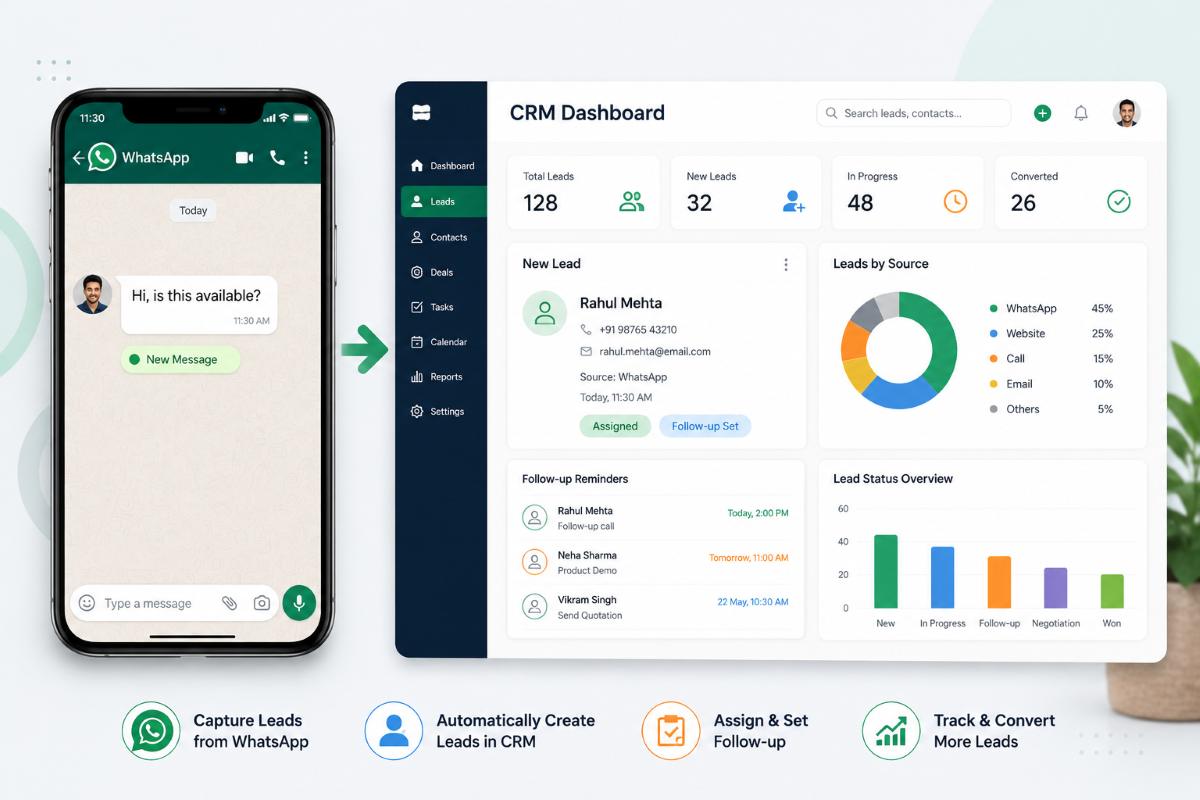
At its core, WhatsApp CRM software is a system that connects your WhatsApp Business number to a proper customer relationship management platform, so the CRM tracks, organises, and assigns every chat, lead, and follow-up automatically instead of letting them sit scattered across someone’s personal phone.
Think of it this way — a regular CRM keeps records of your customers. This kind of platform does the same thing, except the conversation itself happens inside WhatsApp, where your customer already is. Nobody has to open a separate app, fill a form, or wait for an email reply. The lead texts you, the system logs it, and your sales team can see the entire chat history, deal stage, and notes without hunting through old messages.
Why This Matters for Indian Businesses Right Now
This matters more in India than almost anywhere else. WhatsApp is now used by well over 500 million people across the country. It has quietly become the default channel for how customers reach out to small and mid-sized businesses, often before they even visit a website. When a business layers a CRM on top of that channel, it stops relying on memory and sticky notes, and starts running sales like an actual process instead of chasing scattered chats.
That’s even more significant when you take into account the standard Indian purchase lifecycle today. A customer could find a business on Instagram’s reels, ask a quick question on WhatsApp, vanish for 2 days, do some research, and return ready to hear the conversation resume from where it left off. Most businesses just lose the thread without such a system in place, and with it, the sale. That’s why so many owners today say that they are searching for “something that just organises my WhatsApp”, even without knowing what it is called.
How Does WhatsApp CRM Software Work?
Here’s where it gets practical. A WhatsApp CRM doesn’t replace WhatsApp — it plugs into it using the official WhatsApp Business Platform (or, in simpler setups, a supported connector for the WhatsApp Business App). Once connected, every incoming and outgoing message flows through the CRM in real time.
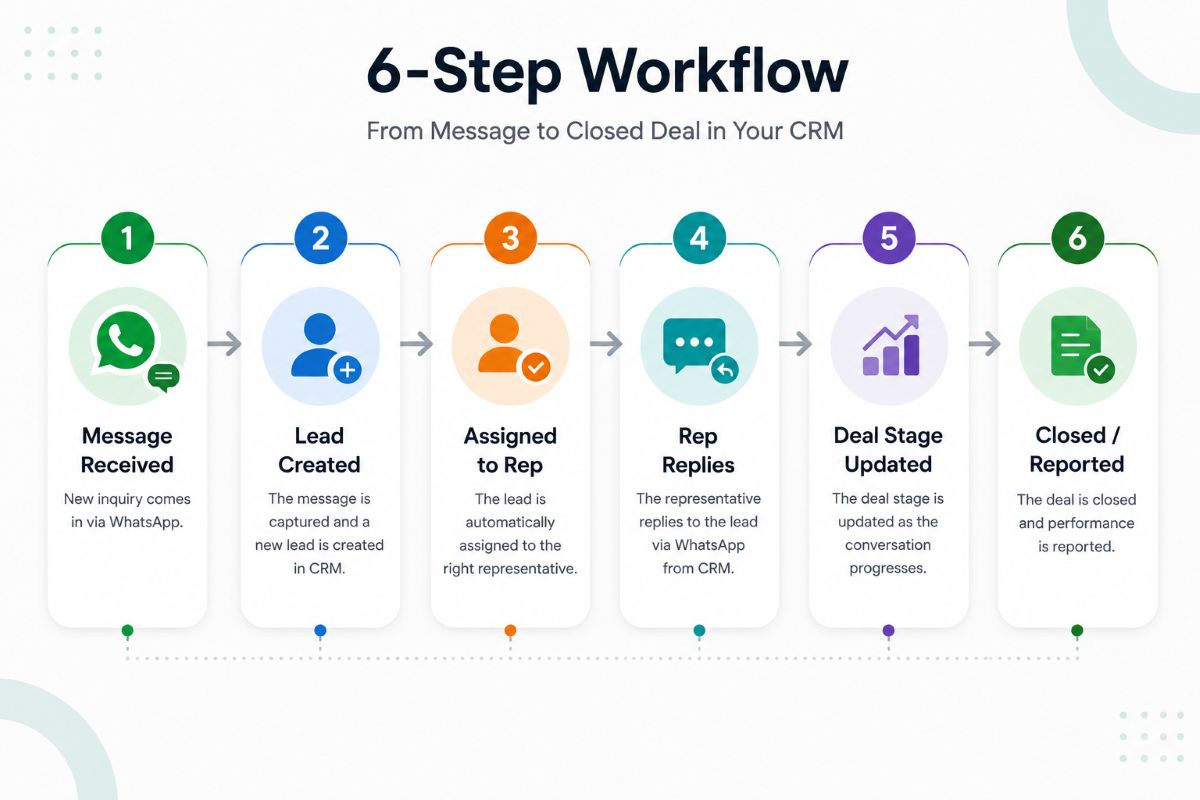
Here’s what typically happens, step by step:
- A customer sends a message to your business WhatsApp number.
- The CRM automatically captures new inquiries and associates returning messages with existing contacts.
- The CRM assigns the conversation to a salesperson or team, either manually or through a rule (for example, by location, product interest, or who’s free).
- The reply comes from inside the CRM, not just from a personal phone.
- The system records the deal stage, adds follow-up reminders, and can automatically reply to frequently asked questions.
- After the deal closes (or drops off), all is on the record for reporting and future re-engagement.
That means that a lead never just goes away because someone in the company didn’t save it or didn’t send a message. Everything sits in one place, searchable and assigned.
WhatsApp CRM Software vs a Traditional CRM: What Actually Changes?
| Aspect | Traditional CRM (Email/Call-based) | WhatsApp-Based CRM |
| Where the conversation happens | Email, phone calls, forms | Directly inside WhatsApp |
| Response speed | Hours, sometimes days | Minutes, since it’s a chat-first channel |
| Lead capture | Manual entry after a call or form fill | Automatic, the moment a message arrives |
| Follow-up | Depends on a rep remembering | Automated reminders and sequences |
| Customer comfort | Feels formal, sometimes ignored | Feels familiar, higher open rates |
| Team visibility | Scattered across inboxes and notebooks | Centralised chat history per contact |
Why Indian SMBs Are Switching to WhatsApp CRM Software in 2026
A few numbers explain the shift clearly. As per the DemandSage report, there are already about 1.5 crore businesses using WhatsApp Business in India, representing the maximum number of WhatsApp Business users in the world. According to industry estimates quoted in IAMAI’s Digital India Report, nearly 80% of small business owners today use WhatsApp to connect and engage with their customers.
Not a coincidence! Most Indian customers, particularly those not in metro areas, are more at ease typing the message “hi, is this available?” on WhatsApp than completing a contact form or being put on a cold call. That means for the business owner, the leads are already coming to him at the right time; the only thing he is missing is a system to accept them and nurture them properly rather than just lose them in a scroll of old chats.
This is also why WhatsApp lead management has become such a specific, searched-for need. It’s not the marketing broadcasts in WhatsApp anymore; it’s not losing one of your warm leads who walks in through the chat.
How to Choose the Best WhatsApp CRM: Key Features
Not every WhatsApp CRM software tool is built the same way. When it comes to choosing an option, the following are things that truly make the best WhatsApp CRM platforms stand out from a standard chat application:
- Shared team inbox — multiple salespeople can use the same WhatsApp number without getting in each other’s way when it comes to responding.
- Automatic lead tagging — new chats are automatically labelled according to source, product interest, or campaign – no manual sorting afterward.
- Pipeline view — you can see exactly which leads are “New,” “Follow-up,” “Negotiation,” or “Closed” at a glance.
- Template messages — pre-approved WhatsApp templates for order updates, reminders, and offers, sent without manual typing each time.
- Reporting — response time, conversion rate, and rep-wise performance, so you know what’s actually working.
- Integration with other lead sources — IndiaMART, JustDial, Instagram DMs, and website forms feeding straight into the same pipeline.
A platform that ticks most of these boxes is generally what people mean when comparing options for a growing Indian business, rather than a large enterprise with a dedicated IT team.
Types of WhatsApp CRM Solutions: Which Fits Your Business Size
Not every business needs the same setup. Here’s a quick way to place yourself before you start comparing tools:
| Business Size | What You Typically Need | Setup Effort |
| Solo owner / 1–2 people | Basic chat assignment, simple contact list | Very low, often a free plan |
| Small team (3–10 people) | Shared inbox, lead tagging, follow-up reminders | Low, a few days |
| Growing SMB (10–30 people) | Automation, multi-source lead capture, reporting | Moderate, a week or so |
| Multi-branch / franchise | Role-based access, branch-wise reporting, API access | Higher, needs a short onboarding call |
Quick Snapshot: What to Compare Before Choosing a Tool
Instead of comparing tools purely on price, it helps to compare them against a fixed checklist first:
| Criteria | Why It Matters |
| Budget (free / paid / per-user) | Decides whether you start on a free plan or need paid automation from day one |
| Team size using the same number | More than one rep replying means you need a shared inbox, not a personal phone |
| Automation need | Order confirmations and follow-ups save the most time once volume grows |
| API vs Business App | The App suits low volume; the API is needed for scale and verified messaging |
| Other lead sources | Check if IndiaMART, JustDial, or Instagram DMs can feed into the same pipeline |
| Data handling | Confirm the vendor follows DPDP-compliant storage and opt-out practices |
WhatsApp CRM Free vs Paid: What’s the Real Difference?
A lot of business owners start their search looking for a WhatsApp CRM free plan, and that’s a fair place to start — but it helps to know what you’re actually getting.
Free or free-tier tools usually let you connect one WhatsApp number, manage a limited number of contacts, and use basic chat assignment. That’s genuinely enough for a very small team just getting organised. Where free plans tend to fall short is automation, reporting, and multi-agent access — the features that matter once your lead volume grows past what one person can track manually.
Paid plans, on the other hand, usually unlock automated follow-ups, deeper reporting, and integration with the official WhatsApp Business API, which is what allows verified business messaging, broadcast templates, and higher message limits. For most SMBs in India, the sensible path is starting on a free or low-cost plan to test the workflow, then moving to a paid setup once the lead volume justifies it — there’s rarely a need to over-invest before you know your actual chat volume.
How to Decide Between Free and Paid
A useful way to decide is to count how many WhatsApp enquiries your business genuinely handles in a week. Under twenty or so, a free plan will likely cover you comfortably. Once that number climbs into the hundreds, or once more than one person needs to reply from the same number, the limitations of a free tier tend to show up quickly — missed handoffs, duplicate replies, and no clear record of who spoke to whom.
Affordability is worth a specific mention here, since a lot of Indian SMBs assume a proper CRM has to mean a large monthly bill. In reality, tools built specifically for the Indian market tend to price per user in rupees rather than dollars, which keeps the cost close to what a small business would already spend on a basic phone plan.
How WhatsApp Lead Management Actually Works Inside a CRM
WhatsApp lead management is really just the discipline of making sure no lead falls through the cracks — and a CRM enforces that discipline automatically instead of hoping a busy salesperson remembers.
Here’s what it looks like in practice:
- Every new WhatsApp chat becomes a trackable lead card, not just a conversation.
- Leads get a status — new, contacted, interested, not interested, closed — that updates as the conversation moves forward.
- The CRM sets automatic reminders if a lead hasn’t replied within a set number of hours or days.
- Reports show exactly how many leads came in this week, how many converted, and where the drop-off is happening.
For businesses juggling multiple lead sources — say, IndiaMART enquiries alongside Instagram DMs and walk-in referrals — this single view is often the difference between a sales team that’s constantly firefighting and one that’s actually converting on time.
WhatsApp Sales Automation: Turning Conversations Into Closed Deals
WhatsApp sales automation is where a CRM starts saving real hours, not just organising chats. Instead of a rep typing the same pricing message fifty times a day, the CRM can trigger it automatically the moment a lead asks a qualifying question.
Common automation use cases for Indian SMBs include:
- Instant auto-reply the moment a new chat comes in, even outside business hours.
- Automated follow-up sequences for leads who’ve gone quiet for 2–3 days.
- Order and payment confirmations sent automatically once a deal is marked “won.”
- Abandoned-enquiry nudges – a soft follow-up for those who enquired about a price but never followed up.
It’s not about making conversations robotic. It’s to ensure that the basic, repetitive portion of a sales conversation takes place quickly, and that your team’s time is spent with the leads that require human interaction.
CRM WhatsApp Integration: How the Setup Actually Works
For most businesses, crm whatsapp integration involves connecting your existing WhatsApp Business number to the CRM through Meta’s WhatsApp Business API, either directly or through an approved provider. The general flow looks like this:
- Sign up your business and WhatsApp number with a verified Business Solution Provider.
- Connect that verified number to your CRM platform.
- Set up your message templates and get them approved by Meta (required for anything outside a live customer reply).
- Map your existing lead sources — website forms, IndiaMART, ad campaigns — into the same CRM pipeline.
- Assign team roles so the right person handles the right conversation.
Done properly, this integration usually takes a few days, not weeks, and doesn’t require your team to change how they already talk to customers on WhatsApp — it just gives that conversation a proper home.
A Quick Note on Data Privacy: DPDP Act 2023 and WhatsApp CRM
A WhatsApp CRM system collects contact details, including phone numbers, chat logs, and personal information, making it firmly in the scope of India’s Digital Personal Data Protection (DPDP) Act, 2023. In practical terms, that means businesses should choose a CRM that stores data securely, only collects what’s necessary for the sale, and gives customers a clear way to opt out of future messages. If you’re evaluating a WhatsApp business CRM for a regulated industry — healthcare, finance, or education — this is worth confirming with the vendor directly before you commit.
How 99Sales CRM Brings This Together for Indian Businesses
At 99Sales CRM, the WhatsApp business CRM is built specifically around how Indian SMBs actually sell — native WhatsApp integration, INR-based pricing, and a lead pipeline that pulls in IndiaMART, JustDial, and Instagram enquiries alongside your WhatsApp chats. Instead of asking your team to learn a new tool, it works inside the app they already use every day, so the switch from scattered chats to an organised pipeline happens without a steep learning curve.
There’s also a practical cost angle worth mentioning. Enterprise-grade platforms built for global markets often price in dollars and assume large sales teams, which makes them a poor fit for a five-person business in Kolkata or Coimbatore. A CRM priced and built for the Indian SMB market, with WhatsApp as a first-class channel rather than an add-on, tends to get adopted faster simply because it matches how the team already works — no retraining, no workflow overhaul, just the same conversations with a proper system behind them.
A Simple Example: How This Plays Out for a Real Business
Picture a Kolkata-based interior design firm running Instagram ads for modular kitchens. Every day, ten to fifteen people message the business account asking for quotes. Without a system in place, those chats sit inside one phone, and whoever isn’t actively checking it misses new enquiries — some for hours, some until the next morning, by which point the customer has already messaged a competitor.
Once that same business connects its number to a CRM, each incoming message becomes a lead card automatically. A designer gets assigned the “Modular Kitchen — Salt Lake” enquiry, a second rep handles “Bedroom Interior — New Town,” and a manager can see, at a glance, how many quotes went out this week and how many turned into paid projects. Nothing depends on one person’s memory anymore. That’s the entire value of connecting WhatsApp to a proper CRM — not a fancier chat window, but a system that quietly keeps every conversation moving toward a decision.
Who Should Actually Use This — and Who Can Wait
Not every business needs this on day one. If you’re a solo owner handling five or six enquiries a week, a notebook and a bit of discipline might genuinely be enough for now. But the moment more than one person replies from the same number, or leads start coming from more than one channel — WhatsApp, Instagram, IndiaMART — manual tracking starts costing you real revenue through missed follow-ups. That’s usually the point where it’s worth setting this up properly rather than waiting until the backlog becomes unmanageable.
FAQs
1. What is a WhatsApp CRM, in simple terms?
It’s a system that connects your WhatsApp Business number to a CRM, so every chat, lead, and follow-up gets tracked automatically instead of living only inside someone’s phone.
2. Is there a genuinely useful WhatsApp CRM free plan available?
Yes, most of them have a free plan that includes one WhatsApp number and initial lead tracking. Good for very small teams, but typically automations and reporting are only available on paid plans.
3. Do I need the WhatsApp Business API, or is the regular WhatsApp Business App enough?
The free WhatsApp Business App is suitable for very small volumes, whereas the WhatsApp Business API is required for multi-agent access, automation, and verified business messaging at scale.
4. How does WhatsApp lead management reduce missed follow-ups?
By automatically tagging every chat as a lead, tracking its stage, and setting reminders when a conversation has gone quiet, so nothing depends on a rep remembering to check back.
5. Is this kind of setup difficult for a non-technical team to manage?
Not usually. Most WhatsApp integration setups take a few days and don’t require coding — you connect your verified number, map your lead sources, and you’re running.
6. Can WhatsApp sales automation replace my sales team?
No — it takes care of the repetitive aspects, such as automated responses and follow-up nudges, so that your team can focus more on valuable conversations and less on administrative tasks.
7. Is WhatsApp CRM data safe under India’s DPDP Act, 2023?
It should be, provided the CRM you choose follows proper data storage practices and gives customers a clear opt-out. Always confirm this with your vendor before onboarding sensitive customer data.
8. What should I look for in the best WhatsApp CRM for a small business?
Look for a shared team inbox, automatic lead tagging, a visible pipeline, template messaging, and integration with your existing lead sources like IndiaMART or Instagram — not just a basic chat connector.
9. Do I need to install any software for a WhatsApp CRM?
No. Most such tools run in the cloud through a web dashboard, so there’s nothing to download or install on your computer — you just log in and connect your verified WhatsApp number.
10. Can I download WhatsApp CRM software for free?
Not exactly as a download — it isn’t that kind of software. What’s actually available is a free plan or trial you sign up for online, which covers basic features before you decide whether to upgrade.
Conclusion
At the end of the day, WhatsApp CRM software isn’t about adding another tool to your day — it’s about giving the conversations you’re already having a proper home instead of letting them disappear into a scroll of old chats. For Indian SMBs especially, where WhatsApp has quietly become the first place a customer reaches out, this shift matters more than most businesses realise until they’ve already lost a few leads to a missed reply. Whether you start with a free plan to test the workflow or move straight to a paid setup with full automation, the goal stays the same: no enquiry should ever depend on someone remembering to check their phone in time. Once that piece is in place, everything else — faster replies, cleaner reporting, a team that isn’t firefighting — tends to follow on its own.
Still Losing Leads in Your Personal WhatsApp? There’s a Better Way
Every day your team spends replying from a personal phone instead of a shared system is a day some enquiries quietly slip through. 99Sales CRM was built from scratch for Indian small businesses — not adapted from a global platform and repriced into rupees. You get native WhatsApp integration, automatic lead capture from IndiaMART, JustDial, and Instagram, and a clean pipeline that keeps every conversation assigned and on record.
Getting started takes days, not weeks. And pricing stays simple in INR — no per-user fees climbing as your team grows.
Start Your Free Trial at 99salescrm
About This Article
Written by the 99Sales CRM Team — sales and CRM specialists focused on helping Indian SMBs build faster, more consistent sales processes on WhatsApp. 99Sales CRM is built for the Indian market, with native WhatsApp integration, INR pricing, and features designed around how Indian sales teams actually operate.
Last updated: July 2026