Your sales team is probably already living inside WhatsApp. A lead comes in, someone replies from a personal phone, the follow-up gets buried in a group chat, and by the time a manager asks, “What happened to that Mumbai lead?” nobody has a straight answer. This is exactly the gap that WhatsApp CRM integration closes, and it’s why Indian sales teams are adopting it faster than almost any other market in the world right now.
In this guide, we’ll break down how the setup actually works. We’ll cover why it matters for Indian B2B and D2C teams heading into the rest of 2026. We’ll also look at what it costs and how to roll it out without disrupting your existing sales process. Common mistakes and a feature checklist follow too. Finally, we’ll show how a platform like 99Sales CRM makes the whole process far less technical than it sounds.
What Is WhatsApp CRM Integration, Exactly?
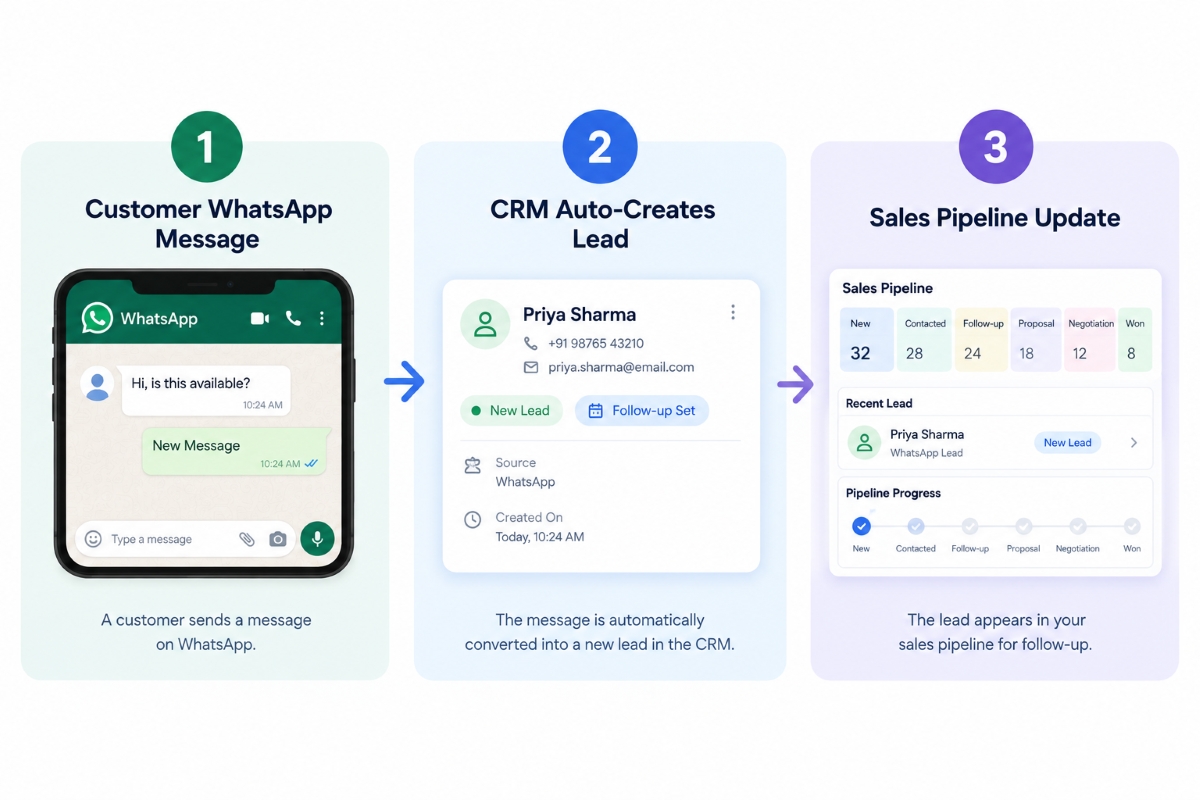
In simple terms, WhatsApp CRM integration means connecting your WhatsApp Business number to your customer relationship management software, so every message, lead, and conversation lands automatically inside one system instead of being scattered across personal phones and app screens.
Instead of a salesperson replying from their own device, every chat gets logged, tagged, and assigned inside the CRM. As a result, nothing depends on one employee’s phone, memory, or goodwill. Once the connection is set up, three things happen automatically:
- Every inbound WhatsApp message creates or updates a lead record inside the CRM
- Conversation history stays attached to that customer permanently, even after a salesperson leaves the company
- Follow-ups, reminders, and pipeline stages move forward together with the actual chat thread
In short, WhatsApp stops being a side channel that lives on someone’s personal phone and becomes a core, trackable part of your sales workflow. That’s the entire promise of a properly built CRM system: one source of truth, and far less guesswork for the whole team.
Why Indian Sales Teams Need This Now, Not Later
India has well over 500 million WhatsApp users. For most Indian buyers, WhatsApp is the first and most trusted way to talk to a business. Often it beats email or even a phone call. Meta’s pricing structure has also shifted meaningfully in 2026. Billing moved from a per-conversation model to a per-message model in mid-2025. From January 2026, marketing message rates for India rose by roughly 10 percent. Even after that increase, per-message rates in India remain among the cheapest globally. That’s well below what businesses pay in the US, UK, or Germany. Still-low-cost messaging plus near-universal adoption explains why WhatsApp CRM integration has become a default requirement for Indian sales teams, not a nice-to-have.
There’s also a cultural angle worth mentioning here. Indian buyers, whether in Tier 1 metros or smaller Tier 3 towns, generally prefer a quick WhatsApp message. They’d rather do that than fill out a web form or wait on hold for a call centre agent. Businesses that still route every lead only through email or phone calls quietly lose deals. Competitors who reply on WhatsApp within minutes win those deals instead. If your sales team hasn’t set this up yet, you are very likely losing leads you never even get to see.
Festival seasons, regional language preferences, and India’s mobile-first buying habits all push in the same direction, too. A customer browsing a product page at 11 PM will be far more likely to tap “Chat on WhatsApp.” Filling out a contact form and waiting for a callback the next morning feels slower by comparison.
How WhatsApp CRM Integration Actually Works, Step by Step
Here’s the practical side of setting up this kind of system, without the technical jargon.
Step 1: Get a WhatsApp Business API Account
The API version differs from the regular free WhatsApp Business app. It lets a CRM connect programmatically and handle multiple agents at once. You’ll typically go through a Meta-approved Business Solution Provider, or a CRM platform that already has this built in. A good CRM handles the Meta verification process on your behalf. Your team skips the technical back-and-forth entirely.
Step 2: Connect the API to Your CRM Software
Once Meta approves your account, your WhatsApp Business number links to your CRM. This happens through an API key or a pre-built connector. From this point onward, every message flows directly into your CRM dashboard, alongside your existing leads, deals, and customer records.
Step 3: Map Your Sales Pipeline to WhatsApp Conversations
This is where the whole setup becomes genuinely useful for a growing sales team. The system auto-assigns incoming chats to the right salesperson based on territory, product interest, or current availability. Conversation tags can also move a lead from “New” to “Follow-up” to “Negotiation” automatically. This works based on keywords, chatbot flows, or manual updates from the agent handling that chat.
Step 4: Set Up Templates and Automation
Meta requires pre-approved message templates for the first message in any new conversation window. Once a customer replies, businesses currently get a 24-hour open window for free-form replies at no charge. Keep an eye on this, though. Meta has already announced that service replies and in-window utility messages will stop being free from October 1, 2026. That changes the cost calculation for support-heavy WhatsApp use. A well-built setup uses the open window smartly regardless. It sends order confirmations, appointment reminders, and payment nudges automatically. An agent never has to type the same message forty times a day.
Step 5: Track, Report, and Optimise
Finally, since every conversation now lives inside the CRM, sales managers can see response times, conversion rates by agent, and drop-off points across the funnel. This visibility alone is often the single biggest reason Indian sales teams report fewer “missing lead” complaints after making the switch.
Key Features to Check Before You Integrate WhatsApp With CRM
Not every solution on the market works the same way. The differences matter once your team scales past two or three agents. Here’s what to actually check before you commit to a platform:
| Feature | Why It Matters for Indian Sales Teams |
| Multi-agent shared inbox | Multiple salespeople can handle one WhatsApp number without stepping on each other’s replies |
| Automatic lead creation | New WhatsApp numbers become CRM leads instantly, with zero manual data entry |
| Template message library | Pre-approved templates for orders, reminders, and offers, available in Hindi, Bengali, or other regional languages |
| Chat-to-pipeline sync | Conversation stage updates reflect instantly inside the sales pipeline view |
| Broadcast and campaign tools | Send bulk WhatsApp messages to segmented lead lists directly from the CRM dashboard |
| Analytics dashboard | Track response time, conversion rate, and agent-level performance in real time |
| Data security and access control | Role-based access so an employee who exits the company can’t walk away with customer chat history |
Ultimately, the goal isn’t just connecting a number to a screen. It’s making sure the integration genuinely improves how fast your team responds. It should also turn more conversations into closed deals, rather than dead leads sitting in someone’s chat list.
Real Benefits Indian Sales Teams Are Seeing in 2026
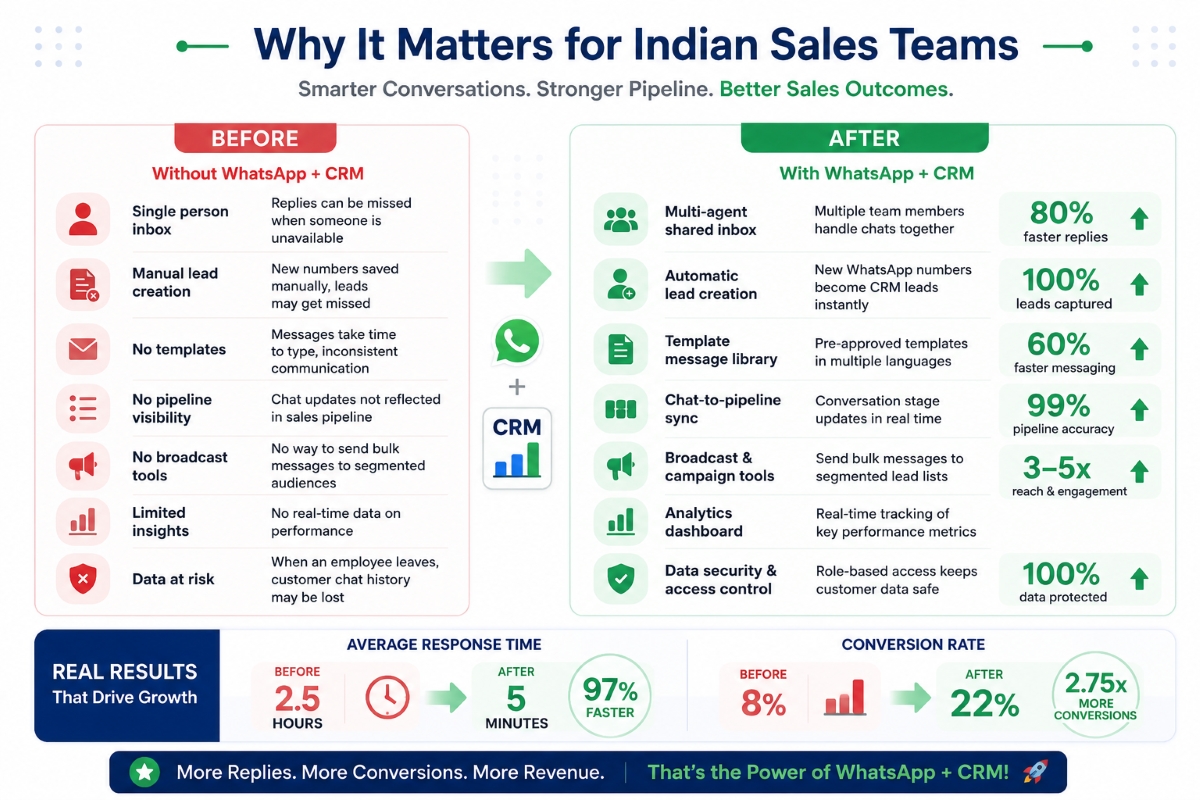
Based on how businesses are using this kind of setup this year, a few patterns show up again and again across industries:
- Faster first response time- since leads route automatically, average reply time often drops from several hours down to just a few minutes.
- No lead leakage when staff exits- chat history stays with the CRM system, not the departing employee’s personal phone.
- Better regional language conversion- templates written in a customer’s preferred language noticeably increase reply rates in Tier 2 and Tier 3 markets.
- Lower cost per lead handled– automation reduces the manual hours agents spend copying details back and forth between WhatsApp and spreadsheets.
- Higher trust with buyers- a verified, green-tick WhatsApp Business number feels more credible than a personal number, which matters especially for high-ticket B2B deals.
On the cost side, Meta shifted India to per-message billing and moved billing to INR in January 2026. This came alongside the marketing rate increase mentioned earlier. Even with these changes, WhatsApp remains one of the most cost-efficient channels available. That’s exactly why it makes financial sense for small and mid-sized Indian sales teams to integrate WhatsApp with CRM. Large enterprises with dedicated IT budgets aren’t the only ones who benefit.
Common Mistakes Businesses Make When They Integrate WhatsApp With CRM
Even though the setup sounds fairly simple on paper, plenty of Indian businesses still get it wrong. Here are the mistakes worth avoiding from day one:
- Using personal WhatsApp numbers instead of the Business API- this quietly blocks automation, reporting, and multi-agent access altogether.
- Ignoring Meta’s template approval rules- poorly written templates get rejected, delaying campaign launches by days.
- Skipping opt-in consent from customers- sending marketing messages without proper consent risks account bans and damages long-term brand trust.
- Not training the sales team on the new workflow- a powerful system is wasted if agents keep replying from personal phones purely out of old habit.
- Overloading customers with broadcast messages- this increases opt-outs and can flag your business number for review by Meta.
- Treating the rollout as a one-time IT project- pipelines, templates, and automation rules need periodic review, especially with Meta’s pricing and policy changes landing through the rest of 2026.
Consequently, the technology itself matters less than how disciplined your rollout is. A CRM can automate most of the mechanics, but the sales team still needs a clear, repeatable process to follow every single day.
How to Measure ROI After You Integrate WhatsApp With CRM
Setting up the connection is only half the job. Sales managers should track a few core numbers before and after the rollout; otherwise, it’s hard to know whether the investment actually paid off.
Start with first-response time, since this usually shows the sharpest improvement in the first month. Next, track lead-to-conversation rate. This tells you how many inbound WhatsApp chats actually get a reply before the customer moves on to a competitor. Follow this with conversation-to-deal conversion, since a fast reply means little if the pipeline stages afterward stay messy or inconsistent.
It also helps to compare cost per lead handled before and after automation, factoring in both the CRM subscription and Meta’s per-message charges. In most cases, Indian SMBs find that the time saved on manual follow-ups and spreadsheet updates outweighs the monthly subscription cost within the first quarter. Reviewing these numbers every month, rather than only during the initial rollout, keeps the whole system honest and prevents the setup from quietly reverting back to old habits.
WhatsApp for Business Integration With CRM: Choosing the Right Fit for SMBs
Indian small and mid-sized businesses face a slightly different set of constraints than large enterprises. Budgets run tighter, and in-house developer support is often limited. Owners generally want a working system within days, not a six-month IT rollout.
For this reason, a flat-rate, India-first CRM tends to be the more practical route for most SMBs. It beats stitching together a separate BSP, a generic CRM, and custom developer work. This approach to WhatsApp for Business integration with CRM keeps monthly costs predictable. Support conversations also stay local, in a time zone and language your team is comfortable working in.
How 99Sales CRM Makes This Simple for Indian Teams
This is where a purpose-built platform like 99Sales CRM removes most of the friction. No more juggling a separate messaging provider, a CRM, and custom developer work on the side. 99Sales CRM brings the WhatsApp Business API, lead management, and pipeline tracking into a single flat-rate INR product, built specifically for Indian SMBs.
In practice, this means a sales manager in Kolkata, Pune, or Coimbatore can get a fully working setup running within days, not months. No developer, no separate negotiation with Meta. Pricing is a flat monthly rate in rupees, not a confusing per-message markup stacked on top of Meta’s charges. Budgeting stays predictable — what most Indian SMB sales teams need day-to-day.
FAQ
What is WhatsApp CRM integration?
It connects your WhatsApp Business number with CRM software. Incoming messages then automatically create leads, get assigned to the right salesperson, and update the pipeline without manual data entry.
Is WhatsApp CRM integration legal and Meta-approved in India?
Yes, provided it’s done through the official WhatsApp Business API and a Meta-approved provider. Using unofficial third-party tools or bulk-messaging tricks, however, can get your number banned without warning.
How much does it cost to integrate WhatsApp with CRM in India?
Costs vary by provider. Generally, they include a CRM subscription plus Meta’s per-message charges for template messages. Indian rates remain among the lowest globally even after the January 2026 marketing rate increase. Many CRMs, including 99Sales CRM, bundle everything into one flat monthly price.
Can small businesses use a WhatsApp-integrated CRM, or is it only built for large companies?
Small and mid-sized businesses often benefit the most. They usually lack a large sales team, so automation helps them avoid missing leads altogether. Most modern CRMs are priced with SMB budgets in mind.
Do customers need to install anything to chat with a business using this setup?
No. Customers simply message the business’s regular WhatsApp number as they normally would. All the integration work happens entirely on the business side.
What’s the difference between the free WhatsApp Business app and a full WhatsApp for business integration with CRM?
The free app works fine for a solo entrepreneur on one device. A CRM integration, by contrast, uses the WhatsApp Business API, which allows multiple agents, automation rules, and detailed reporting, none of which the basic app supports.
How long does it take to integrate WhatsApp with CRM?
With a ready-made platform, setup usually takes a few days, mostly waiting on Meta’s business verification. Custom-built integrations from scratch can take several weeks instead. It depends on developer availability and internal approvals.
Will this kind of integration work with regional Indian languages?
Yes. Businesses can create and get approval for template messages in Hindi, Bengali, Tamil, and several other regional languages. This usually improves reply rates for Tier 2 and Tier 3 customers, who often prefer their own language over English.
Is the 24-hour free reply window on WhatsApp changing in 2026?
Yes, and it’s worth planning for. From October 1, 2026, Meta will stop offering free service replies and free in-window utility messages. Right now, any reply within 24 hours of a customer message costs nothing — that changes. Businesses with support-heavy WhatsApp usage should factor this into their budgets ahead of the change.
Conclusion
A WhatsApp-integrated CRM isn’t a passing trend anymore; it’s fast becoming the standard way Indian sales teams manage leads through 2026 and beyond. Whether you run a five-person sales floor or a growing SMB with multiple regional teams, connecting WhatsApp to your CRM removes the guesswork, protects customer data when staff leave, and gives managers real visibility into what’s actually happening with every single lead.
If you’re ready to set this up without the technical headache, 99Sales CRM offers a flat-rate, India-first CRM built specifically to make WhatsApp CRM integration simple, affordable, and fast to launch for teams that don’t have time to wait months for an IT project to finish.
Tired of Chasing Leads Across Personal WhatsApp Numbers?
Every unassigned chat is a lead your team might forget to follow up on. If your salespeople are still replying from their own phones, you have no record of what was promised, no way to reassign a conversation when someone’s on leave, and no visibility into who’s actually responding fast and who isn’t.
99Sales CRM fixes this with native WhatsApp Business API integration built specifically for how Indian sales teams work — auto-assigned chats, pipeline stages that update in real time, and a flat monthly price in INR with no per-message surprises. Setup takes days, not months.
Try Your Free Trial at 99salescrm.
About This Article
Written by the 99Sales CRM team, who build and support WhatsApp-first CRM tools for Indian sales teams every day. This guide draws on current Meta WhatsApp Business Platform pricing documentation and real onboarding patterns we see from Indian SMB clients moving off personal WhatsApp numbers.
Related reading: What Is WhatsApp CRM and How Does It Work? | Best CRM Software for Small Business in India 2026
Last updated: September 2026